> ## Documentation Index
> Fetch the complete documentation index at: https://docs.casuro.ai/llms.txt
> Use this file to discover all available pages before exploring further.

# Assessments

> Manage A360 and Case Study assessments with Teamtailor integration.

## A360 Assessment Workflow

Streamline your multimodal screening process directly within Teamtailor.

<Steps>
  <Step title="Create and Launch Assessment">
    Start by creating the assessment in Casuro.
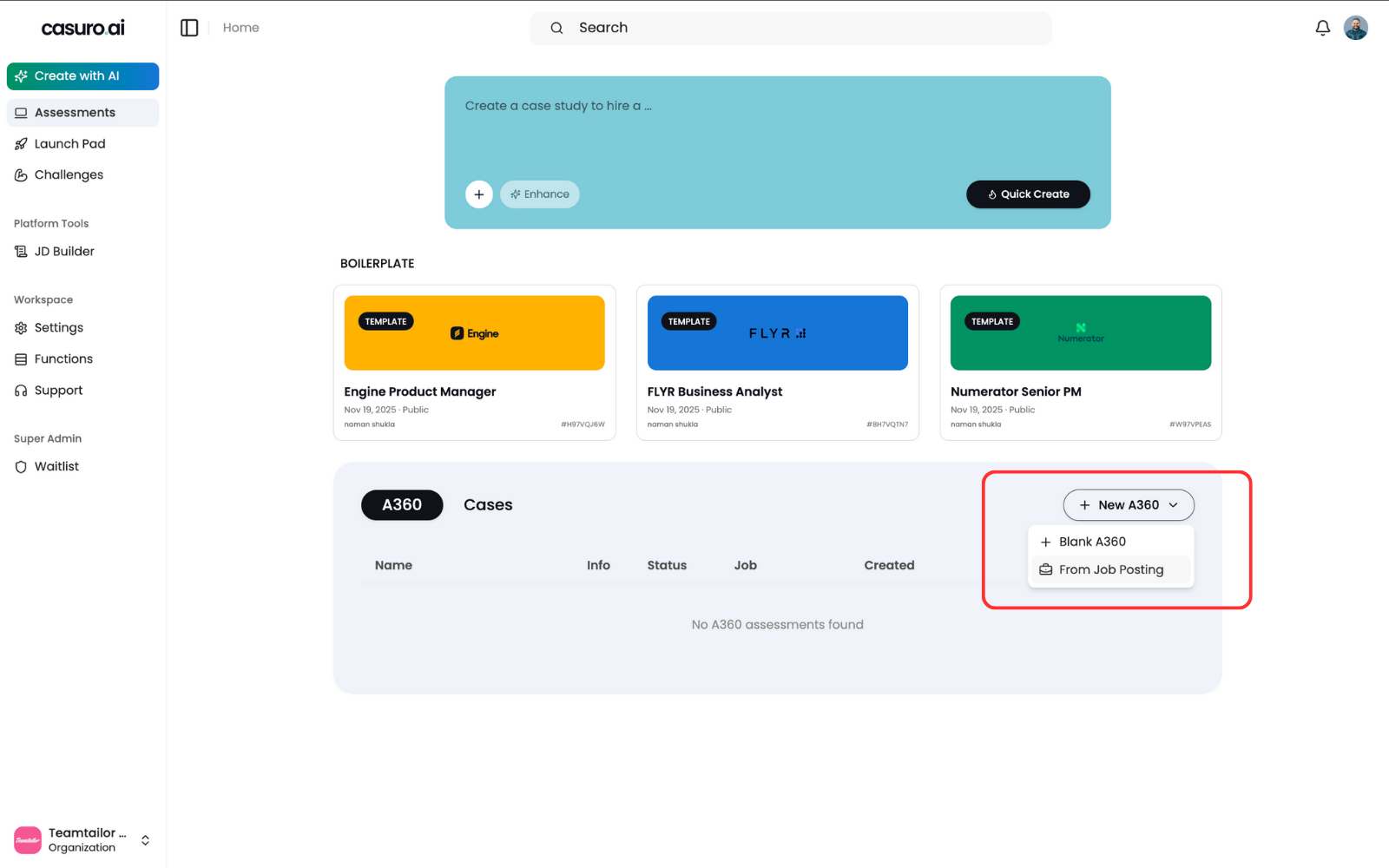
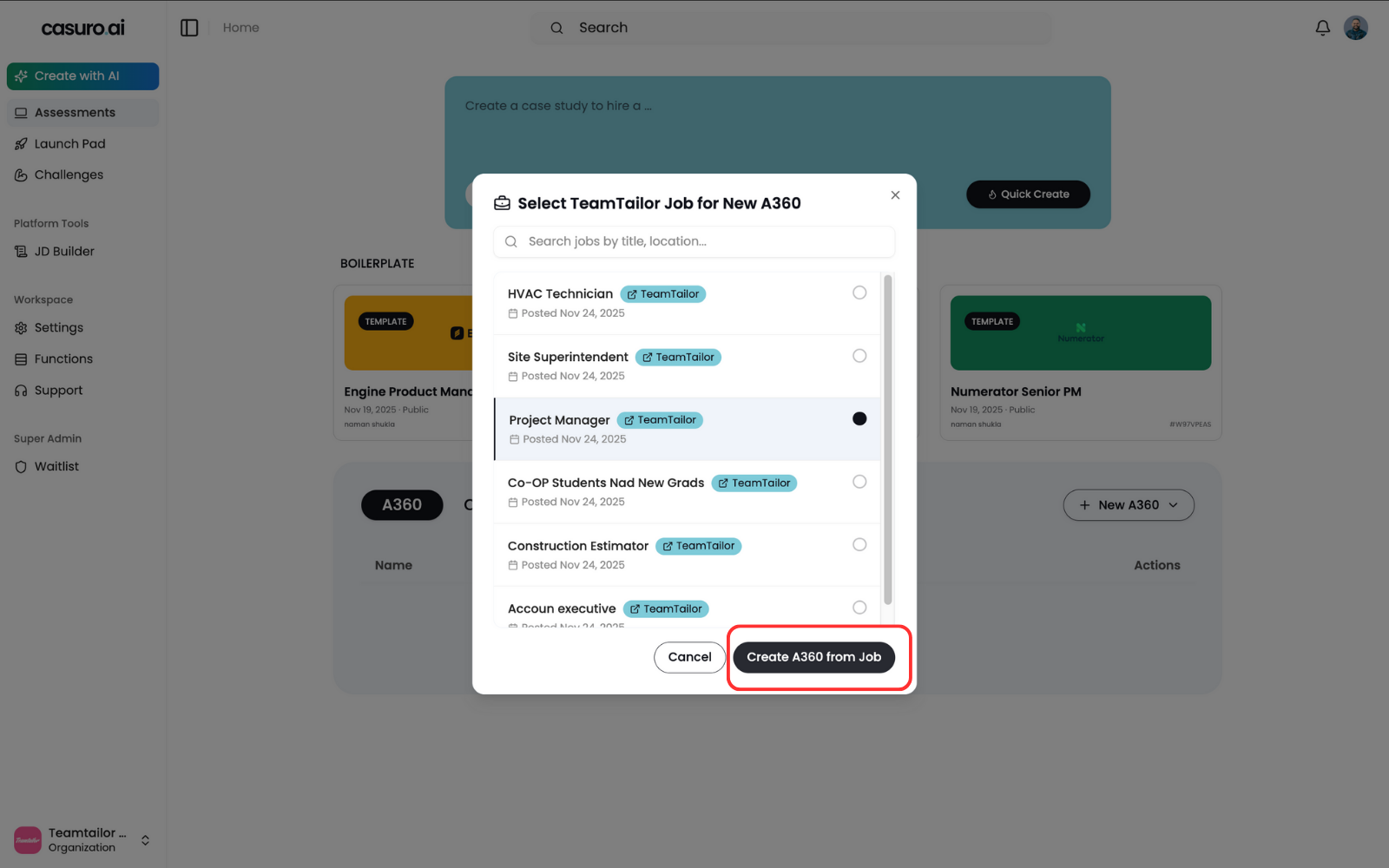
    <Frame caption="In Casuro, select 'A360 Assessment', click 'New A360', and choose 'From Job Posting'.">
      <img src="https://mintcdn.com/casuro/-xcJ83EFSgiX-Wsq/images/integrations/teamtailor/workflow/a360-1.png?fit=max&auto=format&n=-xcJ83EFSgiX-Wsq&q=85&s=979d64fea48f2ca7d47c84b421d16ee8" alt="Create A360" width="1600" height="1000" data-path="images/integrations/teamtailor/workflow/a360-1.png" />
    </Frame>

    <br />

    <Frame caption="Select the relevant job posting and click 'Create'.">
      <img src="https://mintcdn.com/casuro/-xcJ83EFSgiX-Wsq/images/integrations/teamtailor/workflow/a360-2.png?fit=max&auto=format&n=-xcJ83EFSgiX-Wsq&q=85&s=27367eaa9fa621ab0cef8deb063a4f5f" alt="Select Job" width="1600" height="1000" data-path="images/integrations/teamtailor/workflow/a360-2.png" />
    </Frame>

    <br />

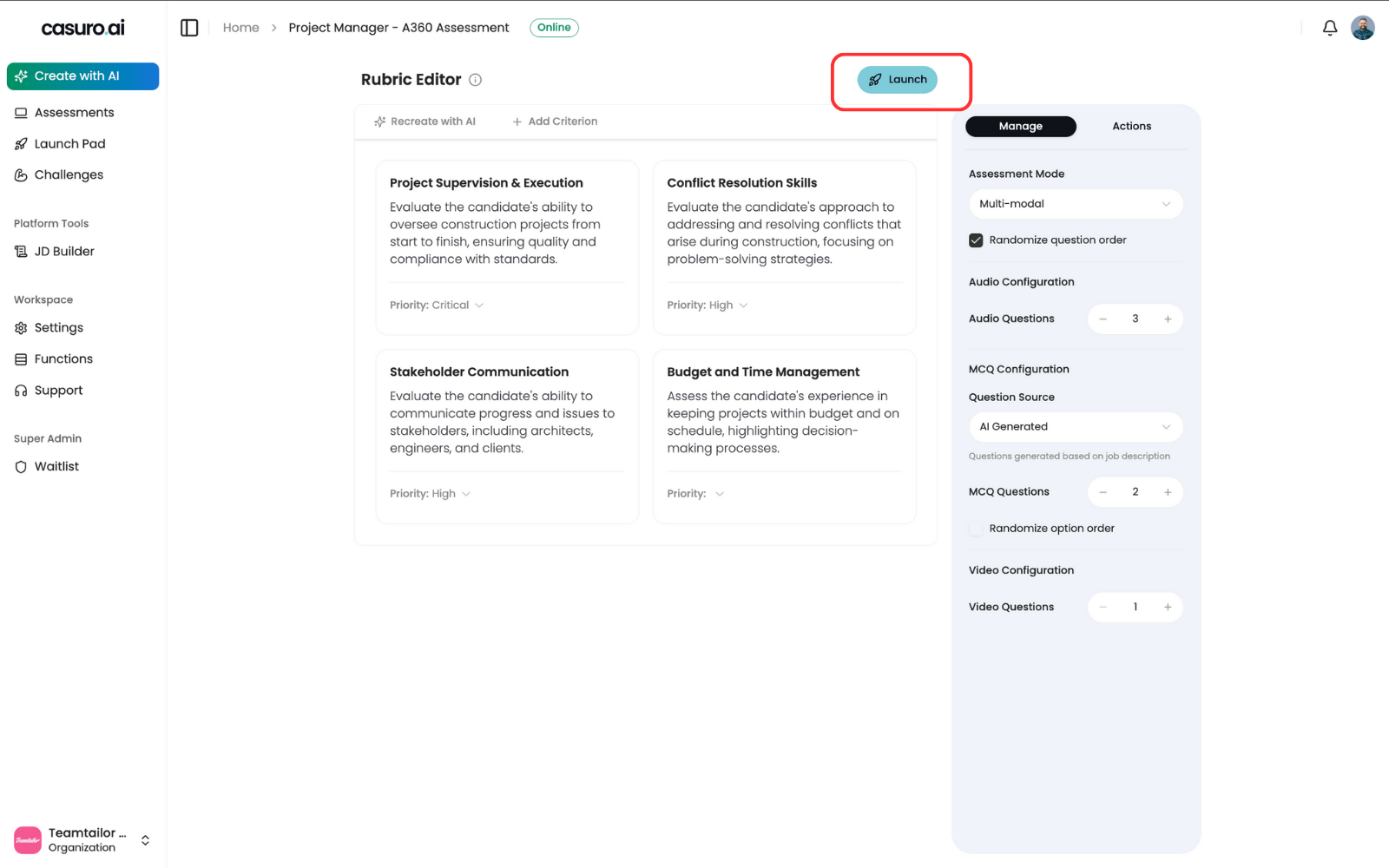
    <Frame caption="Customize your assessment in the editor, then click 'Launch'.">
      <img src="https://mintcdn.com/casuro/-xcJ83EFSgiX-Wsq/images/integrations/teamtailor/workflow/a360-3.png?fit=max&auto=format&n=-xcJ83EFSgiX-Wsq&q=85&s=05998ea3fa3ac0c1a941dcdda3133dd7" alt="Launch Assessment" width="1600" height="1000" data-path="images/integrations/teamtailor/workflow/a360-3.png" />
    </Frame>
  </Step>

  <Step title="Verify Automation (Optional)">
    Ensure the integration is active for the assessment.
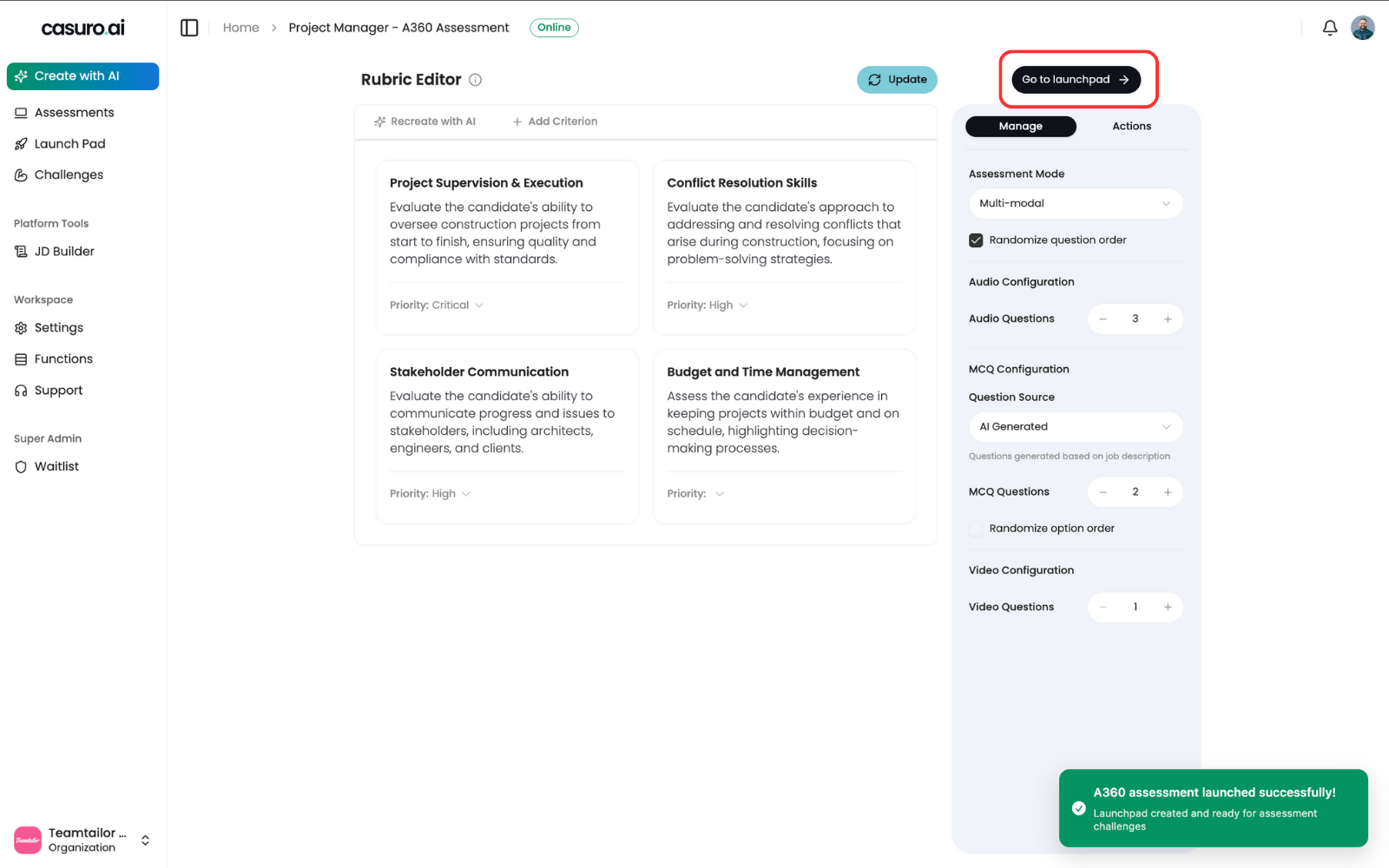
    <Frame caption="From the success screen, click 'Go to Launchpad'.">
      <img src="https://mintcdn.com/casuro/-xcJ83EFSgiX-Wsq/images/integrations/teamtailor/workflow/a360-4.png?fit=max&auto=format&n=-xcJ83EFSgiX-Wsq&q=85&s=42d754f1dacb4ed8e6a3fbd606fdd7cd" alt="Go to Launchpad" width="1600" height="1000" data-path="images/integrations/teamtailor/workflow/a360-4.png" />
    </Frame>

    <br />

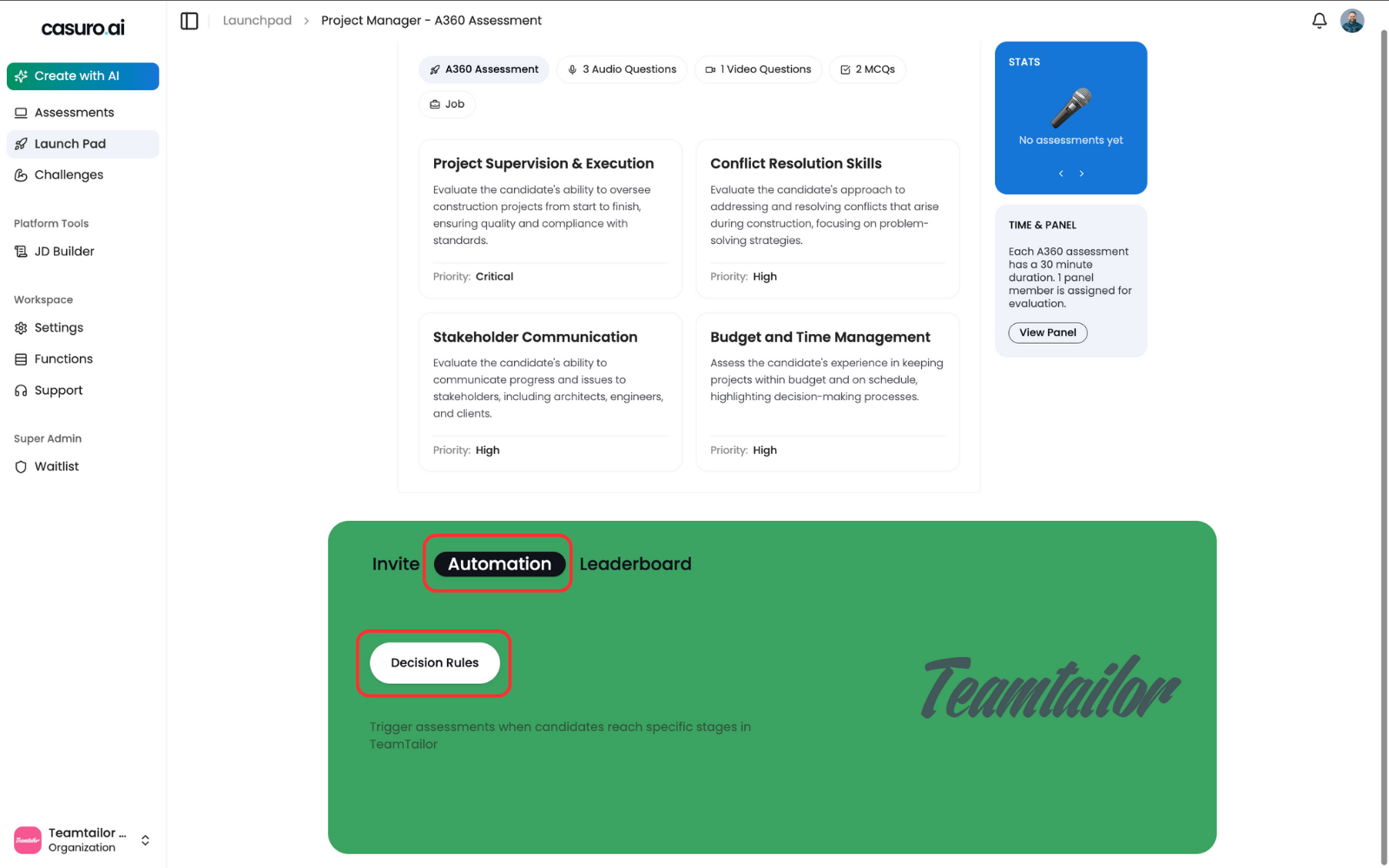
    <Frame caption="In the 'Automation' tab of the Launchpad, verify that the Teamtailor logo is visible.">
      <img src="https://mintcdn.com/casuro/-xcJ83EFSgiX-Wsq/images/integrations/teamtailor/workflow/a360-5.png?fit=max&auto=format&n=-xcJ83EFSgiX-Wsq&q=85&s=15bfb65365740bcd959937e08d1ec727" alt="Automation Tab" width="1600" height="1000" data-path="images/integrations/teamtailor/workflow/a360-5.png" />
    </Frame>
  </Step>

  <Step title="Configure Teamtailor Triggers">
    Set up the trigger in Teamtailor to automatically send assessments.
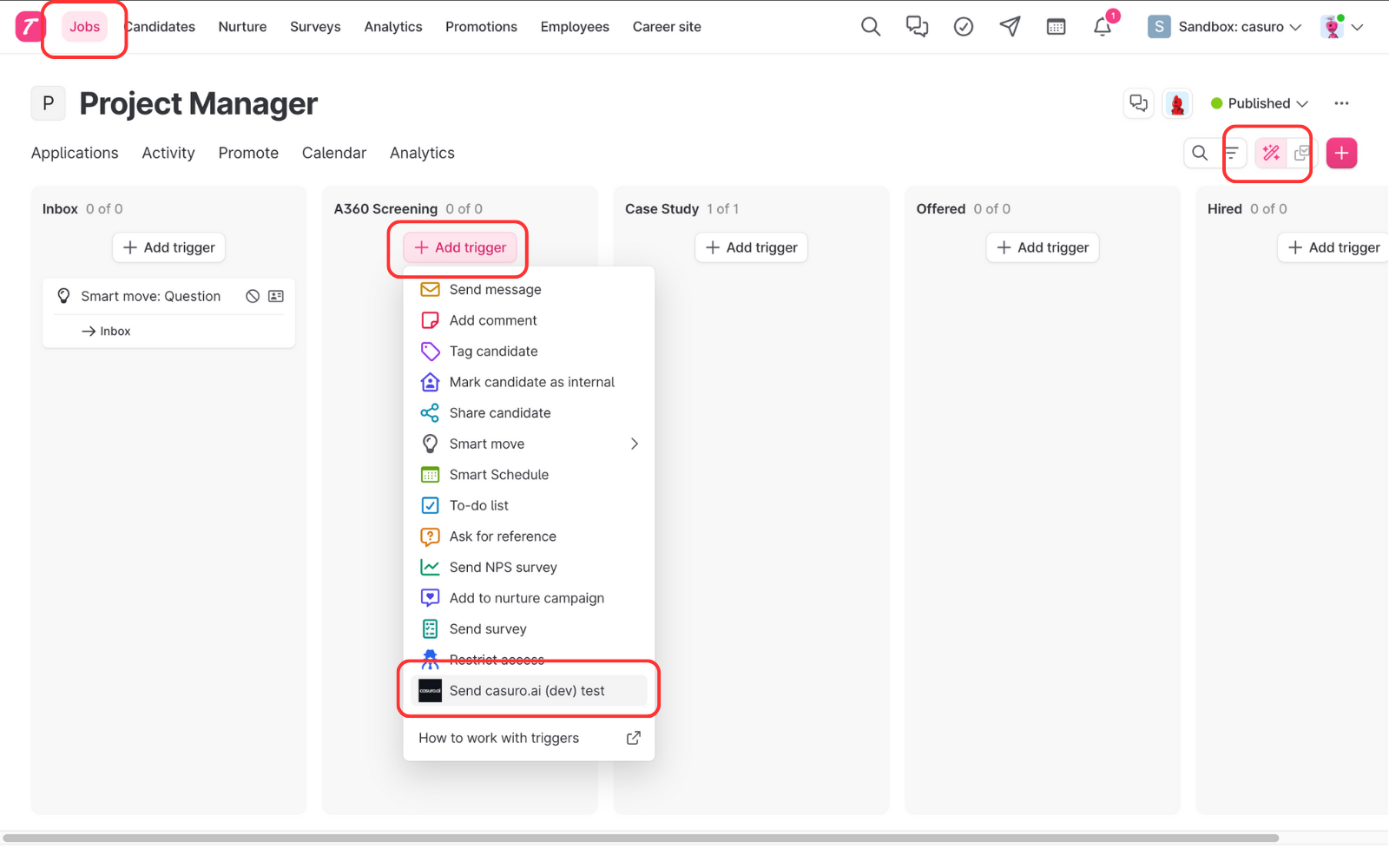
    <Frame caption="In Teamtailor, go to the Jobs page, click 'Triggers' (pencil icon), add a trigger, and select 'Casuro'.">
      <img src="https://mintcdn.com/casuro/-xcJ83EFSgiX-Wsq/images/integrations/teamtailor/workflow/a360-6.png?fit=max&auto=format&n=-xcJ83EFSgiX-Wsq&q=85&s=d1235ffcfc5527dd6d854820a2f59957" alt="Add Trigger" width="1600" height="1000" data-path="images/integrations/teamtailor/workflow/a360-6.png" />
    </Frame>

    <br />

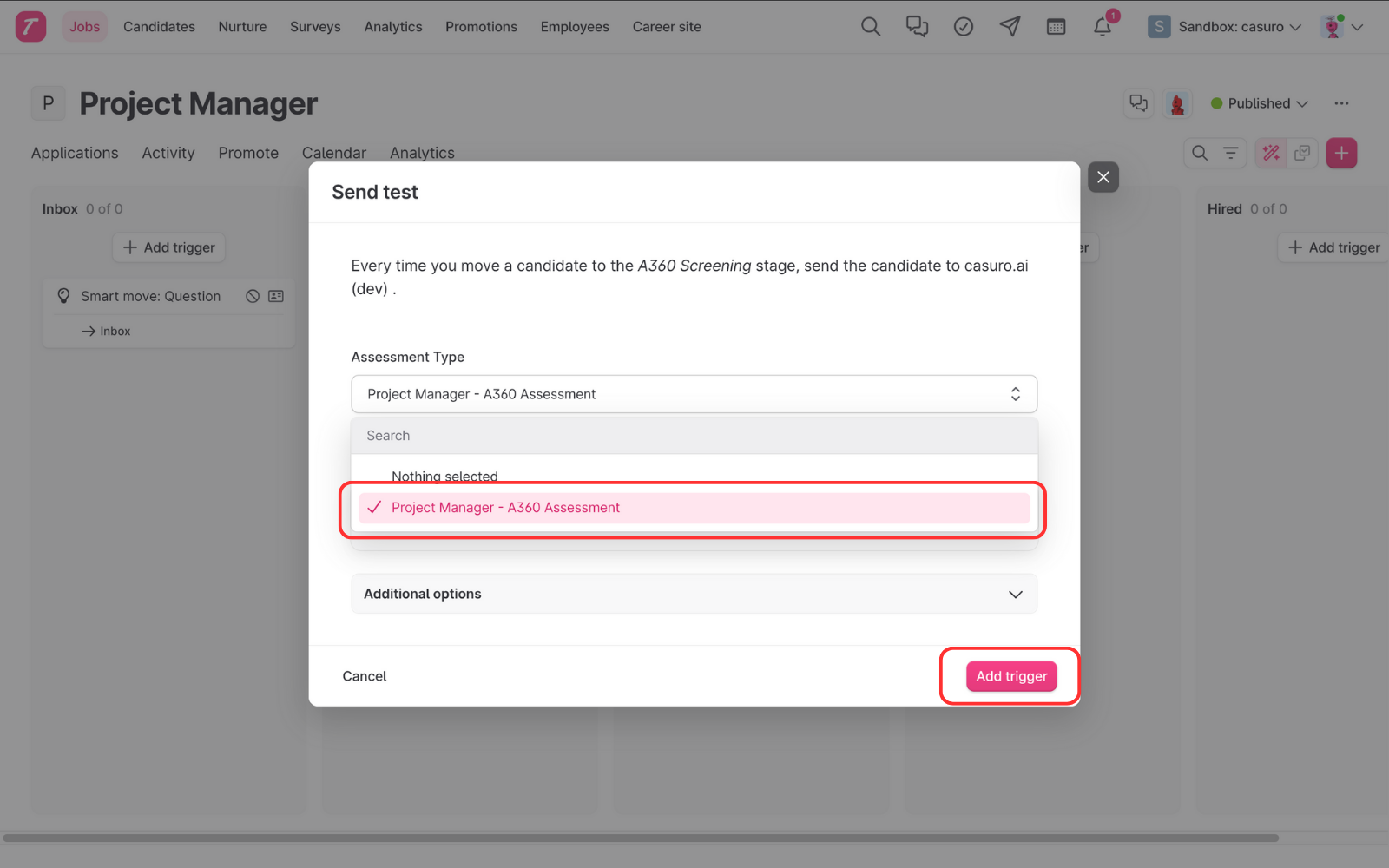
    <Frame caption="Select the assessment you just launched and click 'Add Trigger'.">
      <img src="https://mintcdn.com/casuro/-xcJ83EFSgiX-Wsq/images/integrations/teamtailor/workflow/a360-7.png?fit=max&auto=format&n=-xcJ83EFSgiX-Wsq&q=85&s=a4e3c63864d9fbb6684adb6d786f63e8" alt="Select Assessment" width="1600" height="1000" data-path="images/integrations/teamtailor/workflow/a360-7.png" />
    </Frame>

    Candidates will now automatically receive the assessment when moved to this stage.
  </Step>

  <Step title="Track Progress & Results">
    Monitor candidate status updates directly in Teamtailor.
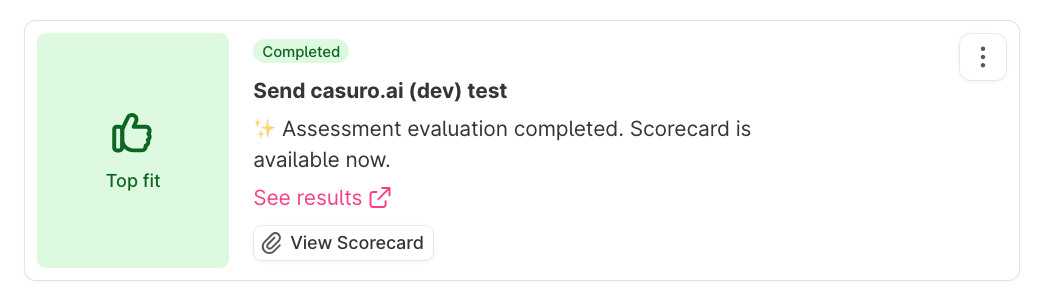
    <Frame caption="Casuro syncs real-time status updates to the candidate's profile.">
      <img src="https://mintcdn.com/casuro/oyBByMeTIYZ7MiHb/images/integrations/teamtailor/workflow/a360-updates.png?fit=max&auto=format&n=oyBByMeTIYZ7MiHb&q=85&s=832537efe72e02a2f5254c06bc90e599" alt="Status Updates" width="1045" height="304" data-path="images/integrations/teamtailor/workflow/a360-updates.png" />
    </Frame>

    **Status Updates Include:**

    * Preparing assessment
    * Invitation sent
    * Assessment started
    * Assessment completed
    * Evaluation started
    * Evaluation completed
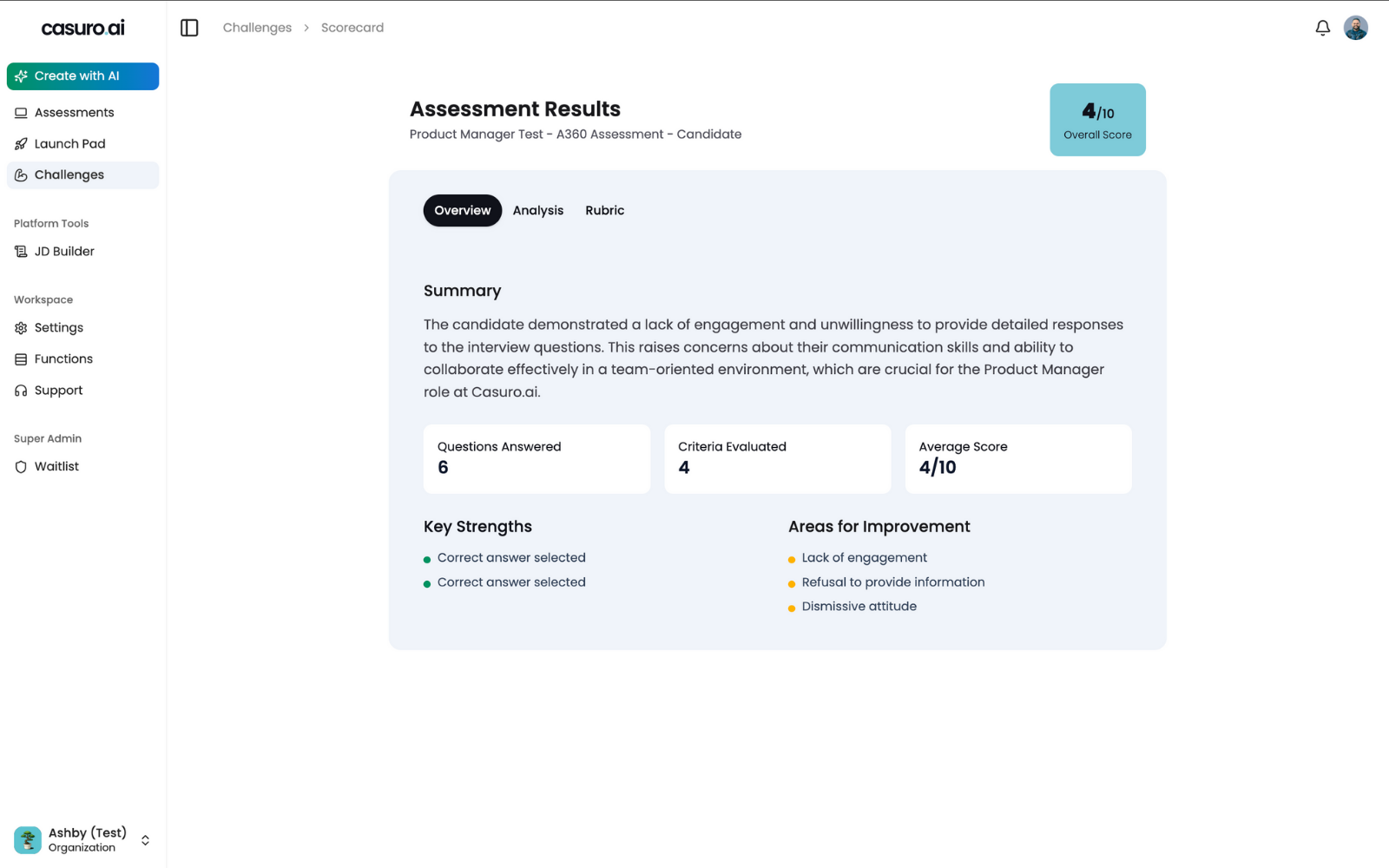
    <Frame caption="Once evaluated, the final score (0-100) and link to the detailed scorecard are synced to Teamtailor.">
      <img src="https://mintcdn.com/casuro/oyBByMeTIYZ7MiHb/images/integrations/teamtailor/workflow/a360-result.png?fit=max&auto=format&n=oyBByMeTIYZ7MiHb&q=85&s=97541dcce68b0491e6fde1dad494bfb3" alt="Scorecard" width="1600" height="1000" data-path="images/integrations/teamtailor/workflow/a360-result.png" />
    </Frame>
  </Step>
</Steps>

## Case Study Assessment Workflow

Deploy realistic work simulations automated through your ATS.

<Steps>
  <Step title="Create and Launch Case Study">
    Generate the case study from your job requirements.
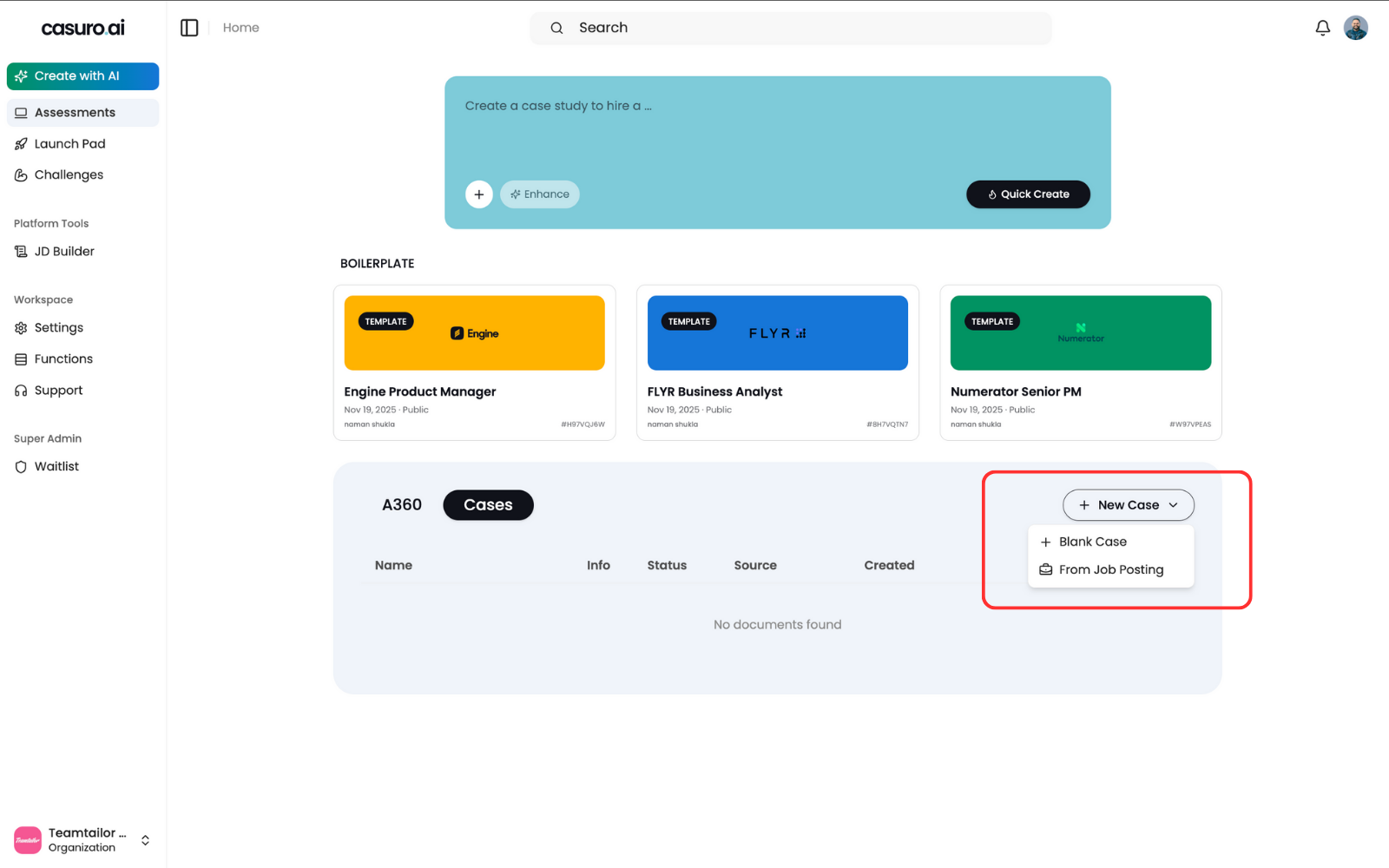
    <Frame caption="In Casuro, select 'Case Study', click 'New Case Study', and choose 'From Job Posting'.">
      <img src="https://mintcdn.com/casuro/oyBByMeTIYZ7MiHb/images/integrations/teamtailor/workflow/case-1.png?fit=max&auto=format&n=oyBByMeTIYZ7MiHb&q=85&s=62cdca55ae6a1895ca47a728d31c70ce" alt="Create Case Study" width="1600" height="1000" data-path="images/integrations/teamtailor/workflow/case-1.png" />
    </Frame>

    <br />

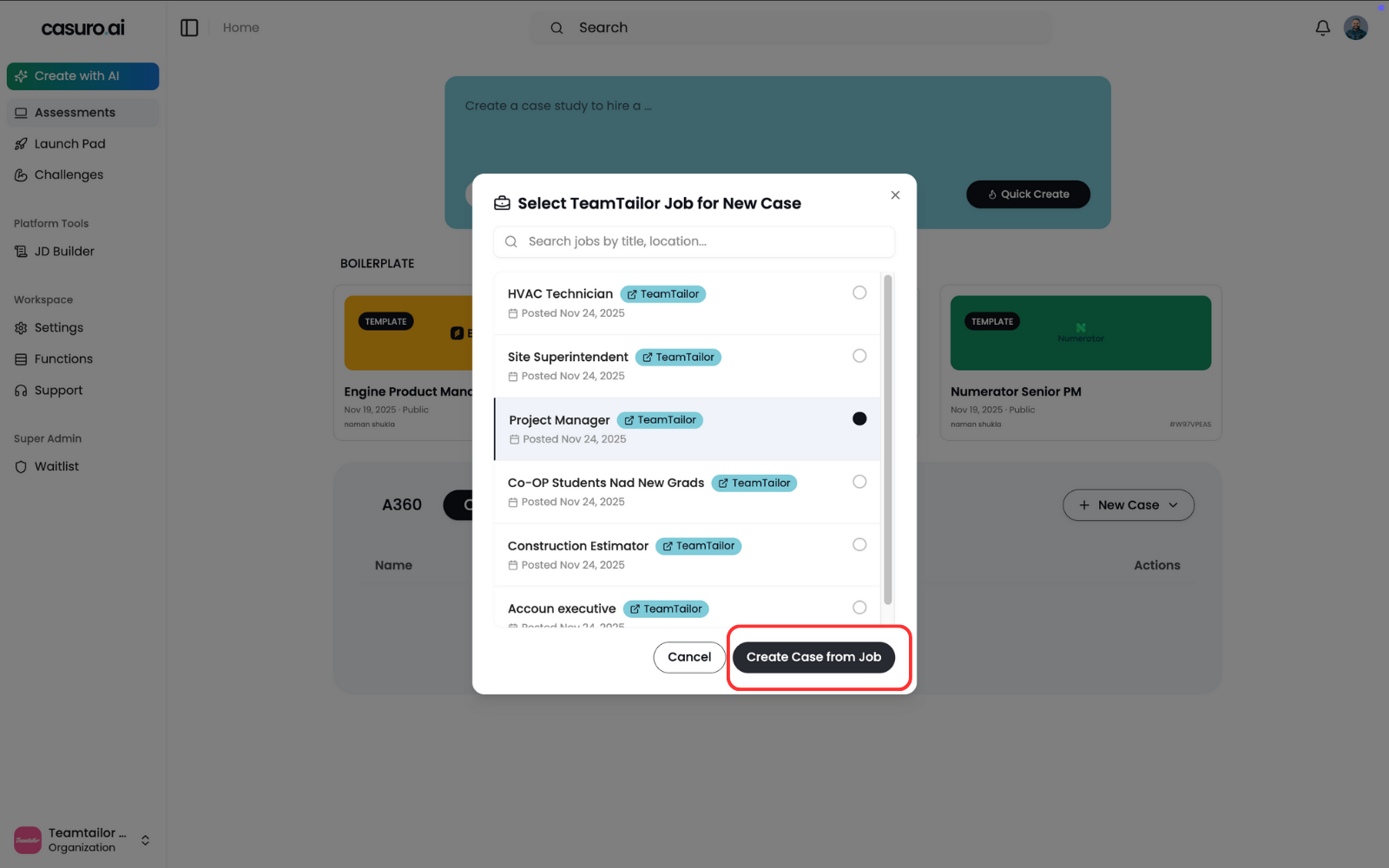
    <Frame caption="Select the job posting to generate the case study context and click 'Create'.">
      <img src="https://mintcdn.com/casuro/oyBByMeTIYZ7MiHb/images/integrations/teamtailor/workflow/case-2.png?fit=max&auto=format&n=oyBByMeTIYZ7MiHb&q=85&s=b985fac86d36f7f705a76b0adb3c076b" alt="Select Job" width="1600" height="1000" data-path="images/integrations/teamtailor/workflow/case-2.png" />
    </Frame>

    <br />

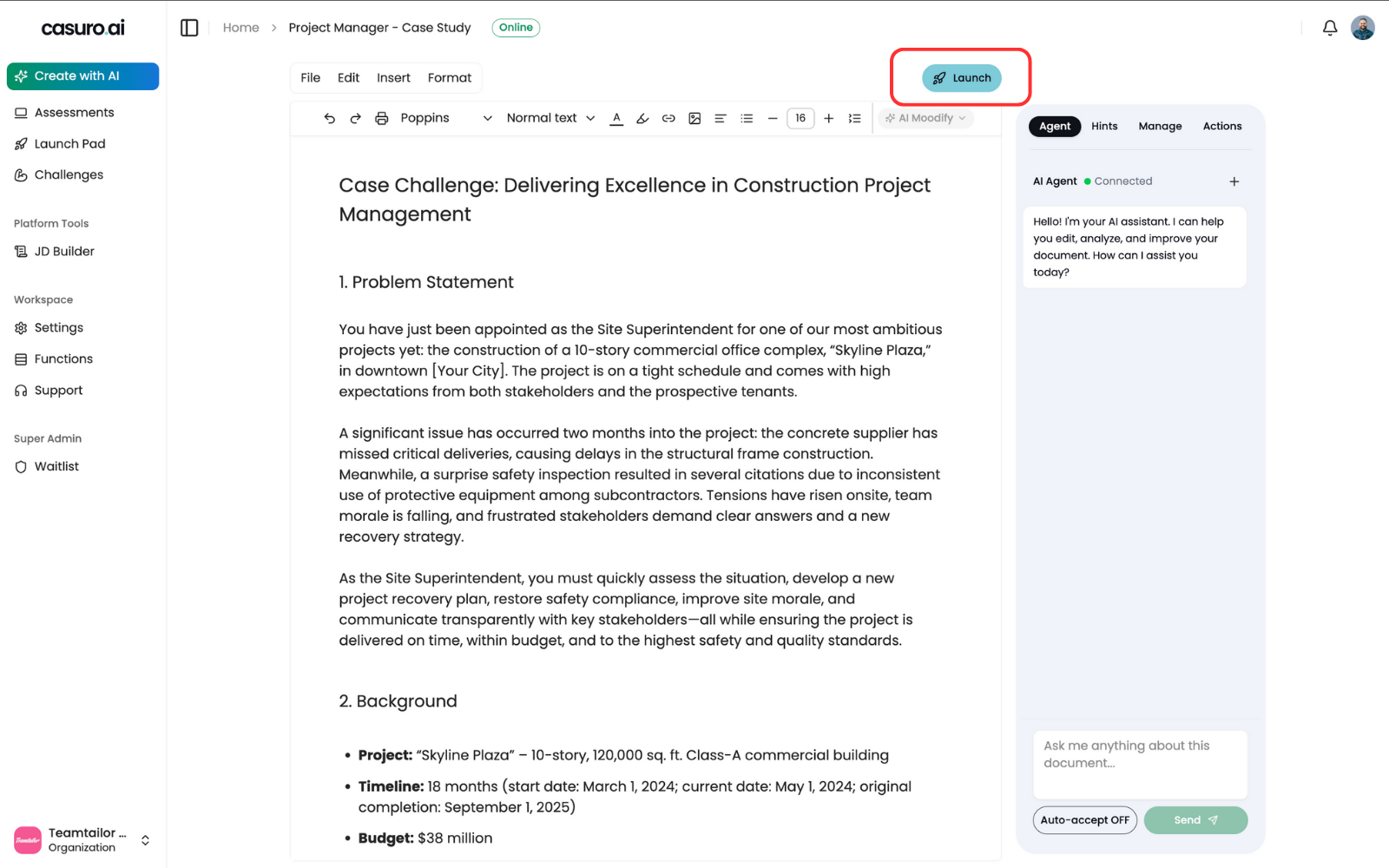
    <Frame caption="Review the generated content in the editor and click 'Launch'.">
      <img src="https://mintcdn.com/casuro/oyBByMeTIYZ7MiHb/images/integrations/teamtailor/workflow/case-3.png?fit=max&auto=format&n=oyBByMeTIYZ7MiHb&q=85&s=011c63cbbd6704f1dee00aa6cd387489" alt="Launch Case Study" width="1600" height="1000" data-path="images/integrations/teamtailor/workflow/case-3.png" />
    </Frame>

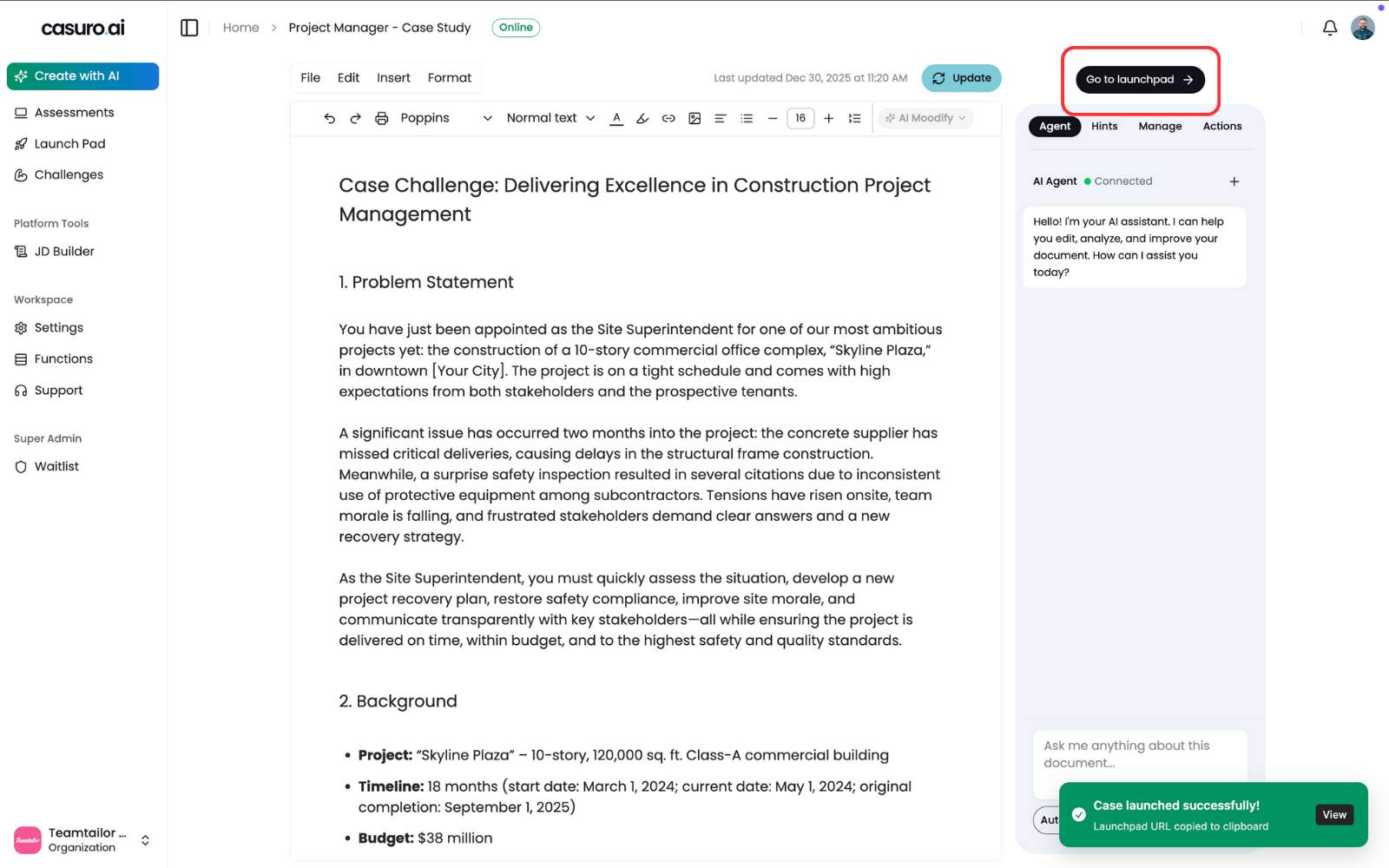
    <Frame caption="'Go to Launchpad' button will appear to confirm the launch.">
      <img src="https://mintcdn.com/casuro/oyBByMeTIYZ7MiHb/images/integrations/teamtailor/workflow/case-4.png?fit=max&auto=format&n=oyBByMeTIYZ7MiHb&q=85&s=1d89e70bf727f7b4808e1214ec19c2f7" alt="Go to Launchpad" width="1600" height="1000" data-path="images/integrations/teamtailor/workflow/case-4.png" />
    </Frame>

    <br />
  </Step>

  <Step title="Configure Teamtailor Triggers">
    Automate the invite process within Teamtailor.
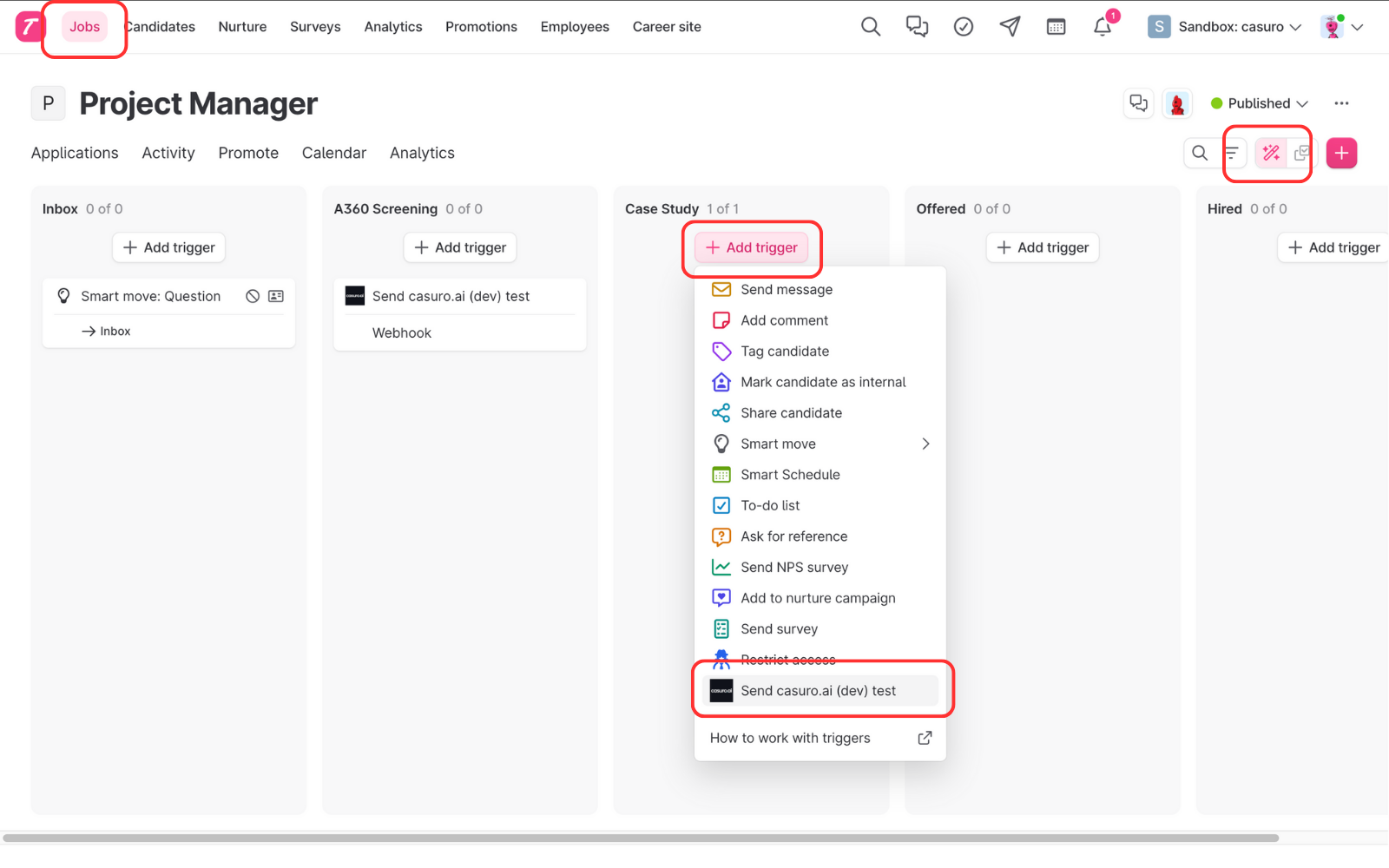
    <Frame caption="Navigate to the Job's 'Triggers' section in Teamtailor, add a new trigger, and choose 'casuro.ai'.">
      <img src="https://mintcdn.com/casuro/oyBByMeTIYZ7MiHb/images/integrations/teamtailor/workflow/case-5.png?fit=max&auto=format&n=oyBByMeTIYZ7MiHb&q=85&s=ede35ffbfe0e683876504ed9cb249ebb" alt="Add Trigger" width="1600" height="1000" data-path="images/integrations/teamtailor/workflow/case-5.png" />
    </Frame>

    <br />

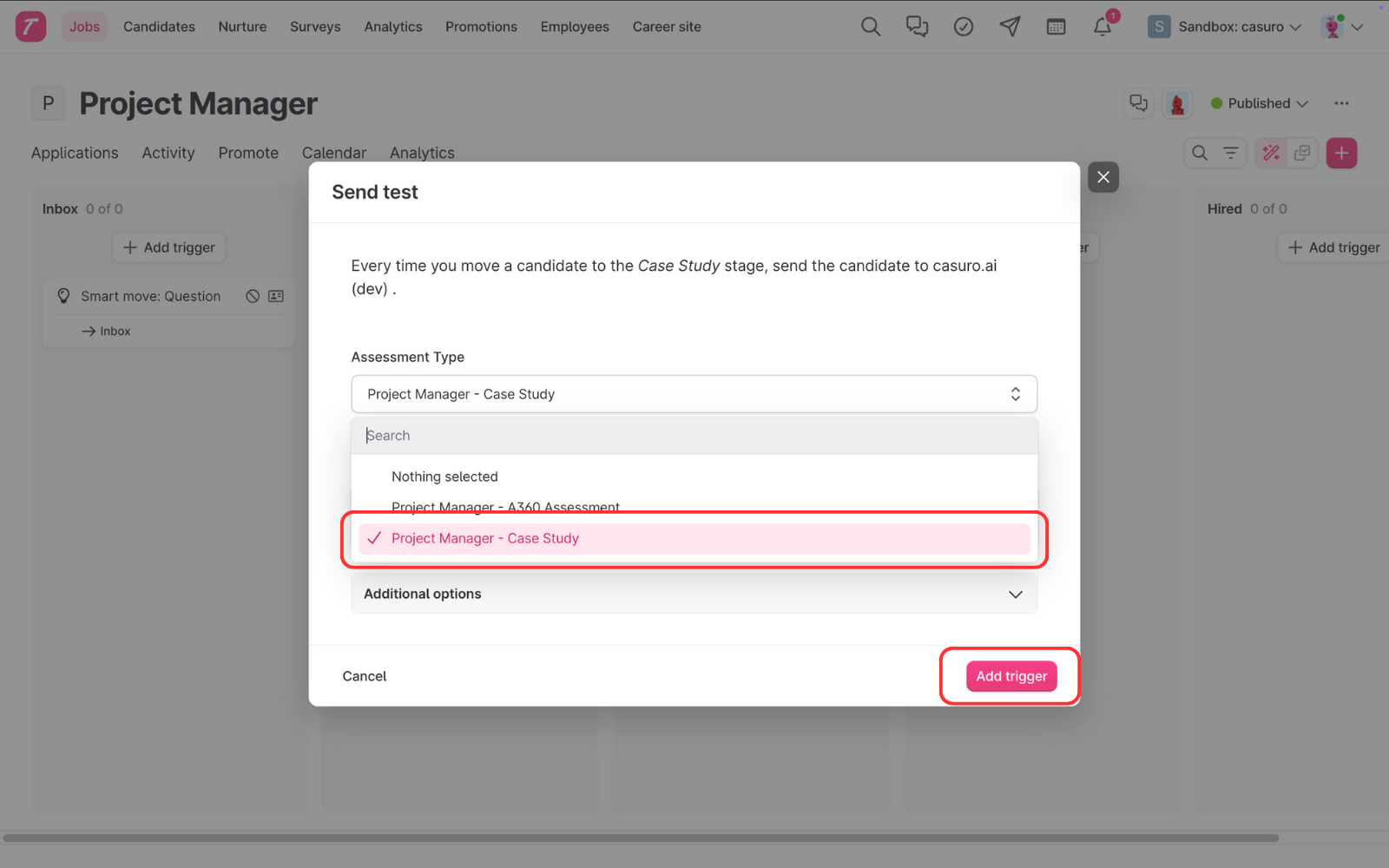
    <Frame caption="Select the corresponding Case Study assessment and save the trigger.">
      <img src="https://mintcdn.com/casuro/oyBByMeTIYZ7MiHb/images/integrations/teamtailor/workflow/case-6.png?fit=max&auto=format&n=oyBByMeTIYZ7MiHb&q=85&s=bcd820bbafdb9c377e875556c8ade7cb" alt="Select Assessment" width="1600" height="1000" data-path="images/integrations/teamtailor/workflow/case-6.png" />
    </Frame>
  </Step>

  <Step title="Track Progress & Results">
    View detailed status updates and scores in the candidate's profile.
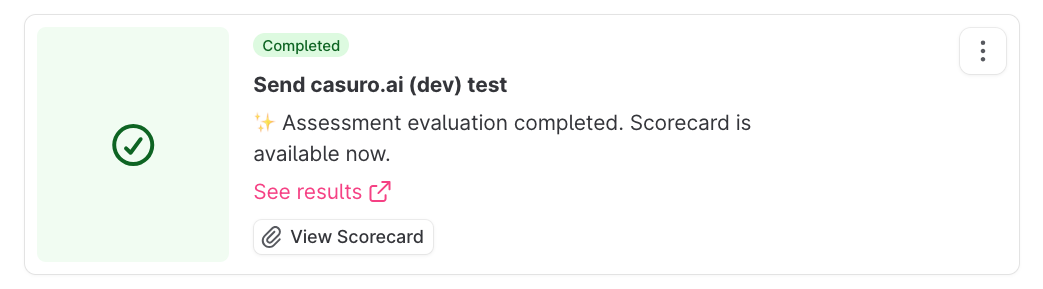
    <Frame caption="Real-time status tracking keeps you informed at every step.">
      <img src="https://mintcdn.com/casuro/oyBByMeTIYZ7MiHb/images/integrations/teamtailor/workflow/case-updates.png?fit=max&auto=format&n=oyBByMeTIYZ7MiHb&q=85&s=11eb59a1b35a13427ca6926700ff8834" alt="Status Tracking" width="1043" height="289" data-path="images/integrations/teamtailor/workflow/case-updates.png" />
    </Frame>

    **Status Updates Include:**

    * Preparing assessment
    * Invitation sent
    * Assessment started
    * Assessment completed
    * Evaluation started
    * Evaluation completed
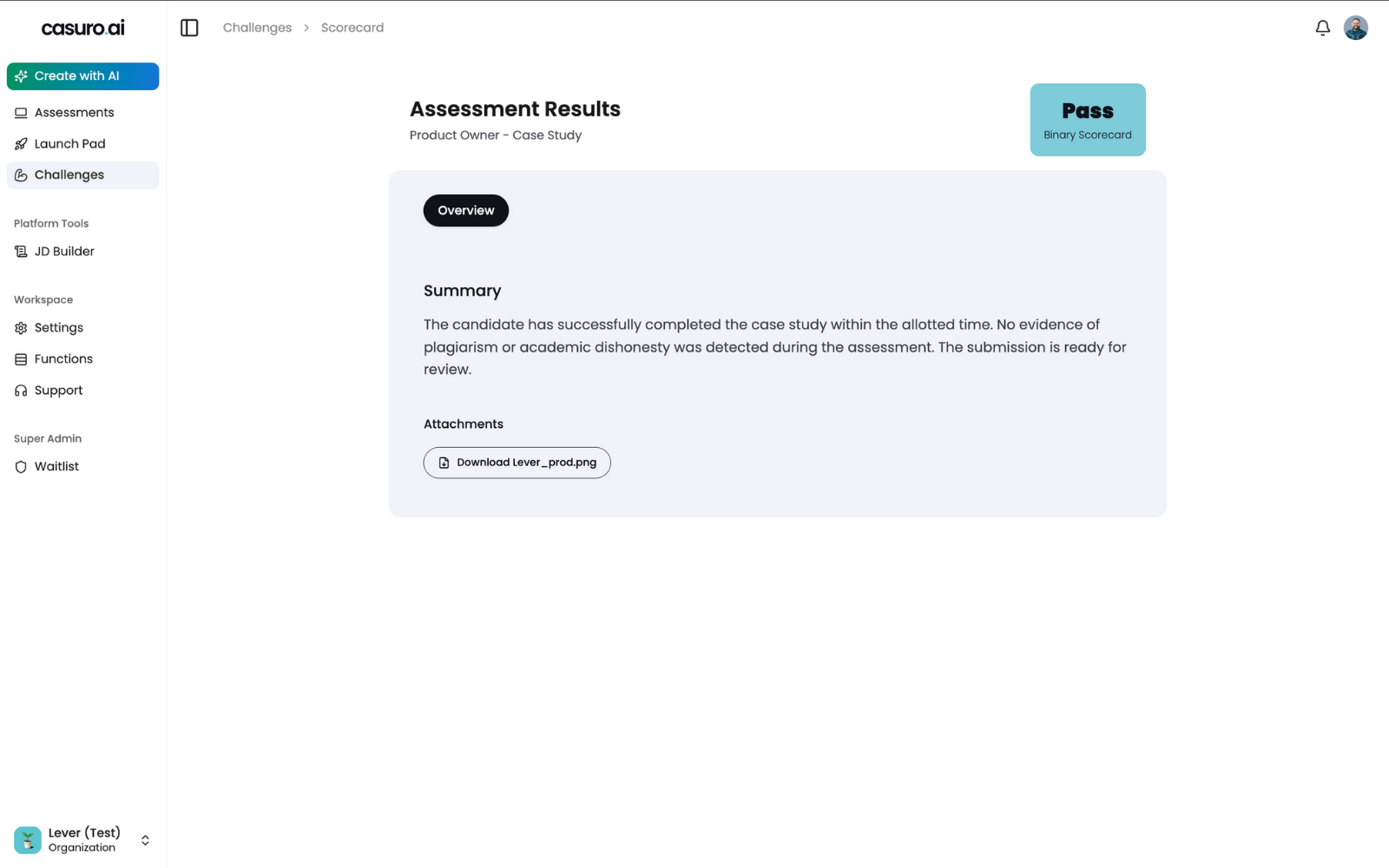
    <Frame caption="Final scores are synced back to Teamtailor, with a direct link to the comprehensive evaluation.">
      <img src="https://mintcdn.com/casuro/oyBByMeTIYZ7MiHb/images/integrations/teamtailor/workflow/case-result.png?fit=max&auto=format&n=oyBByMeTIYZ7MiHb&q=85&s=07b9b500b39299e4be00af2917a49e2f" alt="Final Score" width="1600" height="1000" data-path="images/integrations/teamtailor/workflow/case-result.png" />
    </Frame>
  </Step>
</Steps>